






If you are searching for how to check NECO password, you are not alone. Every year, thousands of candidates, parents, and guardians ask the same question after NECO results are released. The confusion often comes from not understanding what the NECO password really is, where to find it, and how to use it correctly.
This comprehensive guide explains how to check NECO password, how to recover it if forgotten, common mistakes candidates make, and what to do when your password is not working. The explanations are written in clear, human-friendly language and are optimized to help you get the right result without stress.
Understanding What the NECO Password Means
Before learning how to check NECO password, it is important to understand what the password refers to.
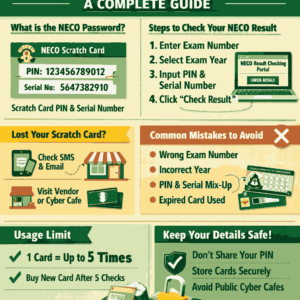
For NECO, the “password” is not something sent to your email or phone. Instead, it is directly linked to your NECO Scratch Card or e-PIN. When checking your NECO result online, the system requires two major details:
- Examination Number
- Scratch Card PIN and Serial Number (used as the password)
So, when people ask how to check NECO password, what they really mean is how to find or retrieve the NECO scratch card details used for result checking.
What You Need Before Checking Your NECO Password
To successfully understand how to check NECO password, make sure you have the following ready:
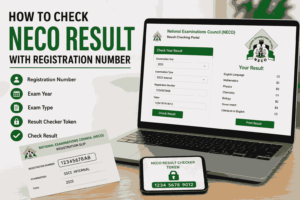
- Your NECO Examination Number
- Your Examination Year
- Your Scratch Card PIN
- Your Scratch Card Serial Number
- A phone, tablet, or computer with internet access
Without these, checking your NECO password or result will not be possible.
How to Check NECO Password Using a Scratch Card
This is the most common and official method. If you still have your scratch card, then how to check NECO password becomes very easy.
Step-by-Step Process
- Locate your NECO Scratch Card
- Gently scratch the silver panel to reveal:
- PIN
- Serial Number
- Go to the official NECO result checking portal
- Enter your Examination Number
- Select your Examination Year
- Enter the PIN (this serves as your NECO password)
- Enter the Serial Number
- Click Check Result
Once this is done correctly, your result will appear.
This method answers the question of how to check NECO password for candidates who still have their scratch card.
How to Check NECO Password If You Lost Your Scratch Card
Many candidates lose their scratch cards and panic. Losing your scratch card does not mean you cannot check your result.
If you are asking how to check NECO password without a scratch card, follow the options below.
Option 1: Check SMS or Email History
If you bought your scratch card online or through a vendor, check:
- SMS messages
- WhatsApp chats
- Email receipts
Many vendors send the PIN and serial number digitally.
Option 2: Visit the Vendor or Cyber Café
If you purchased the card from:
- A cyber café
- A bookshop
- A roadside vendor
Go back to them. Most vendors keep sales records and can retrieve your NECO password details.
Option 3: Buy a New NECO Scratch Card
If recovery is not possible, the only solution is to buy a new scratch card. NECO allows candidates to use multiple scratch cards to check results.
This is a reliable solution when all attempts to recover the old password fail.
How to Check NECO Password Through Online Purchase
Another effective method of understanding how to check NECO password is through online purchase platforms.
Steps
- Visit an approved NECO scratch card sales platform
- Make payment using:
- ATM card
- Bank transfer
- The platform will generate:
- PIN
- Serial Number
- Use these details on the NECO result portal
This method is fast and secure, especially for candidates outside Nigeria.
Common Mistakes People Make When Checking NECO Password
Even when candidates know how to check NECO password, mistakes can still prevent access.
Frequent Errors
- Entering WAEC exam number instead of NECO number
- Selecting the wrong examination year
- Mixing up PIN and Serial Number
- Using already exhausted scratch cards
- Typing extra spaces before or after the PIN
Avoiding these mistakes will save you time and money.
How Many Times Can One NECO Password Be Used?
This is a common question linked to how to check NECO password.
- One NECO scratch card can be used up to five times
- After five checks, the password becomes invalid
- You must buy a new scratch card after exhaustion
Always limit unnecessary result checks to preserve usage.
How to Know If Your NECO Password Is Still Valid
If you are unsure whether your password is valid:
- Try checking the result again carefully
- If the portal says “PIN has been used up”, then it is no longer valid
- If it says “Invalid PIN”, recheck spelling and numbers
Understanding this helps clarify how to check NECO password without confusion.
How to Check NECO Password for GCE Candidates
The process of how to check NECO password for NECO GCE candidates is the same as SSCE candidates.
The only difference is:
- Select NECO GCE as examination type
- Enter your GCE examination number
All other steps remain unchanged.
Is There a Free Way to Check NECO Password?
No. There is no free method to check NECO password or NECO results.
Any website or person claiming:
- “Free NECO password”
- “Free NECO result checker”
is misleading you.
NECO officially requires a paid scratch card or e-PIN.
Why NECO Uses Scratch Card Password System
Understanding this helps candidates accept the process.
NECO uses password-based result checking to:
- Protect candidate privacy
- Prevent result manipulation
- Control access to official data
- Maintain examination integrity
This explains why learning how to check NECO password is important for every candidate.
What to Do If NECO Portal Is Not Opening
Sometimes, candidates think their password is wrong when the real issue is the portal.
Possible Solutions
- Try again at night or early morning
- Use a different browser
- Switch network providers
- Clear browser cache
These steps often resolve access issues when checking NECO password.
Security Tips When Handling Your NECO Password
Since your NECO password gives access to sensitive academic records, protect it.
- Do not share your PIN publicly
- Avoid random cyber cafés
- Save digital copies securely
- Destroy scratch card after use
These habits will protect your result from misuse.
Frequently Asked Questions (FAQs)
1. Can I use one NECO password to check another person’s result?
No. A NECO password works only with the correct examination number. Even if shared, it cannot open another candidate’s result without matching details.
2. What is the cost of a NECO scratch card?
The price varies slightly by vendor, but it is usually affordable. Always buy from trusted sources to avoid fake PINs.
3. Can I retrieve my NECO password from NECO office directly?
NECO offices do not retrieve lost scratch card details. You must recover it from the vendor or buy a new one.
Also Read: How Many People Fail in NECO 2025? Full Analysis, Trends, Reasons, and What It Really Means
Conclusion
Knowing how to check NECO password removes unnecessary anxiety after examinations. The NECO password is simply your scratch card PIN and serial number, not a complicated login detail. As long as you understand where to get it, how to use it, and how to recover it when lost, checking your NECO result becomes easy.
Always use official platforms, avoid shortcuts, and keep your details safe. With this guide, you now have a complete and reliable answer to how to check NECO password from start to finish.












+ There are no comments
Add yours