





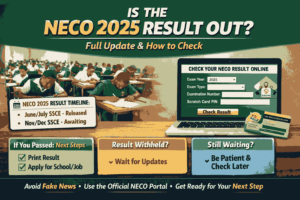
If you are asking how do I check my NECO results online, you are not alone. Every year, millions of candidates across Nigeria search for how to check NECO results online immediately after the National Examinations Council releases its results. Whether you wrote NECO SSCE Internal or NECO SSCE External (GCE), knowing how to check your NECO results online correctly will save you time, money, and unnecessary stress.
This comprehensive guide answers the question “How do I check my NECO results online?” in clear, practical steps. It also explains everything you need to know about scratch cards, common errors, mobile checking, cafés, printing, result validity, and frequently asked questions. The tone is simple, human, and written for everyday users.
What Is NECO and Why Checking Your NECO Results Online Matters
The National Examinations Council is one of Nigeria’s official examination bodies, responsible for conducting and certifying secondary school examinations. NECO examinations include:
- NECO SSCE Internal (June/July)
- NECO SSCE External (Nov/Dec – GCE)
- BECE and other national assessments
Checking your NECO results online matters because:
- It gives you instant access to your grades
- It is accepted nationwide for admissions and employment
- It helps you plan your next academic step quickly
That is why the question how do I check my NECO results online is so important to candidates, parents, schools, and institutions.
What You Need Before You Check Your NECO Results Online
Before you attempt to check your NECO results online, ensure you have the following ready. Many failed attempts come from missing one of these items.
Requirements to Check NECO Results Online
- Examination Year (e.g., 2024)
- Examination Type (SSCE Internal or SSCE External)
- Examination Number
- Result Checking Token or Scratch Card
- Internet-enabled phone or computer
Without these details, you cannot successfully check your NECO results online.
Where to Check NECO Results Online (Official Portal Only)
The only approved place to check NECO results online is the official NECO result portal:
Avoid unofficial websites claiming to help you check NECO results online for free. They often give wrong information or try to scam candidates.
Step-by-Step Guide: How Do I Check My NECO Results Online
This section answers the main question directly: How do I check my NECO results online?
Follow these steps carefully.
Step 1: Visit the NECO Result Portal
Open your browser and go to:
👉 https://results.neco.gov.ng
Step 2: Select Examination Year
Choose the year you sat for the examination (e.g., 2024).
Step 3: Select Examination Type
Pick either:
- SSCE Internal (June/July) or
- SSCE External (Nov/Dec)
Step 4: Enter Your Examination Number
Type your NECO exam number exactly as it appears on your slip.
Step 5: Enter the Token or Scratch Card PIN
Input the token PIN correctly. This is compulsory.
Step 6: Click “Check Result”
Your NECO result will appear on the screen instantly.
If the page does not load, refresh gently or try again later.
How to Buy NECO Result Checking Token
Many candidates ask: Can I check NECO results online without a token?
The answer is NO.
You must purchase a NECO result checking token.
Where to Buy NECO Result Checking Token
- NECO official website
- Accredited cyber cafés
- Selected banks and vendors
The token is reusable for multiple checks within a limited time.
How Do I Check My NECO Results Online Using My Phone?
Yes, you can check your NECO results online using your phone.
Steps to Check NECO Results Online on Mobile
- Turn on mobile data or Wi-Fi
- Open Chrome, Safari, or any browser
- Visit https://results.neco.gov.ng
- Follow the same steps used on a computer
NECO results online work perfectly on Android and iPhone devices.
Common Errors When Checking NECO Results Online and How to Fix Them
Many candidates complain that NECO results are not showing. Below are common problems and solutions.
1. “Result Not Yet Released”
This means NECO has not officially released your exam batch.
2. “Invalid Examination Number”
Recheck the number. Avoid spacing errors.
3. “Token Already Used”
Buy a new token or wait for token reset if allowed.
4. Blank Page or Server Error
Refresh the page or try during off-peak hours (late night or early morning).
How Do I Print My NECO Results After Checking Online?
After checking your NECO results online, you can print it for records.
Steps to Print NECO Results
- Once the result displays, right-click on desktop or tap “Share” on mobile
- Select “Print” or “Save as PDF”
- Print at a cyber café if needed
The printed copy is accepted for most uses.
Is NECO Online Result Valid for Admission and Jobs?
Yes. NECO online results are valid and accepted by:
- Nigerian universities
- Polytechnics and colleges
- Employers
- Scholarship boards
Institutions may later request verification directly from NECO.
How Long Does It Take for NECO Results to Be Released Online?
Usually:
- SSCE Internal: 45–60 days after exams
- SSCE External: 30–45 days after exams
Once released, you can check NECO results online immediately.
Can Someone Else Check My NECO Results Online for Me?
Yes, as long as they have:
- Your exam number
- Examination details
- Token
However, ensure it is someone you trust.
Is There Any Other Way to Check NECO Results Online?
Currently, the NECO online portal is the only official method. SMS and offline checking methods are no longer active.
Safety Tips When Checking NECO Results Online
- Do not share your token publicly
- Avoid unofficial websites
- Do not pay anyone claiming “result upgrade”
- Use trusted cyber cafés
Conclusion: How Do I Check My NECO Results Online Successfully?
To answer the question how do I check my NECO results online, the process is simple but must be done correctly. Visit the official NECO portal, enter accurate details, use a valid token, and follow the steps carefully. Checking your NECO results online gives you fast access to your performance and helps you move forward with confidence.
Always rely on official channels and avoid shortcuts. Your result is important handle it wisely.
Also Read: NECO GCE Registration Fee 2026: Complete Guide, Costs, Dates, and How to Register Successfully
Frequently Asked Questions (FAQs)
FAQ 1: Can I check my NECO results online for free?
No. A NECO result checking token is required to check NECO results online.
FAQ 2: How many times can I check my NECO results online with one token?
A token allows multiple checks within a limited period, depending on NECO policy.
FAQ 3: What should I do if my NECO result has missing subjects?
Contact NECO through your school or the nearest NECO office for correction.








+ There are no comments
Add yours