






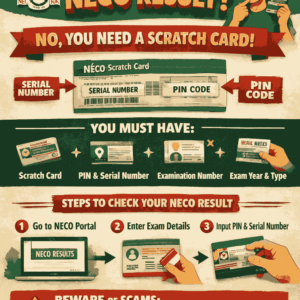
If you are asking “Can I use my serial number to check my NECO result?”, you are not alone. Every year, thousands of Nigerian candidates type this same question into Google immediately NECO releases results. The confusion usually comes from misunderstanding what the serial number, PIN, and scratch card actually do during the NECO result-checking process.
This detailed guide answers the question clearly, truthfully, and completely. It also explains what works, what does not work, common mistakes candidates make, and the correct steps to follow so you don’t waste money or time.
Understanding NECO Result Checking Before Anything Else
Before answering whether you can use your serial number to check your NECO result, it is important to understand how the National Examinations Council (NECO) result system works.
NECO results are not free to access online. Candidates must purchase a NECO Result Checking Scratch Card, which contains two key details:
- Serial Number
- PIN (Personal Identification Number)
These two items work together, not separately.
Key point:
Your serial number alone cannot check your NECO result.
Direct Answer: Can I Use My Serial Number to Check My NECO Result?
No, you cannot use only your serial number to check your NECO result.
The NECO portal requires both the serial number and the PIN from a valid scratch card. Entering just the serial number will not open your result, no matter how correct it is.
This rule applies to:
- NECO SSCE (Internal)
- NECO SSCE External (GCE)
- All recent NECO examination years
Why NECO Does Not Allow Serial Number Alone
NECO designed its result-checking system this way for security and revenue control. If serial numbers alone worked:
- Results would be easily accessed by unauthorized persons
- Candidates’ data could be compromised
- Scratch cards would lose value
The PIN is the main access key, while the serial number confirms the card’s authenticity.
Difference Between Serial Number, PIN, and Examination Number
Many candidates confuse these three items. Let’s clear it once and for all.
1. Serial Number
- Found on the NECO scratch card
- Identifies the card
- Cannot be used alone
2. PIN
- Also on the scratch card
- Grants access to the result
- Mandatory
3. Examination Number
- Issued by NECO to candidates
- Identifies you as a candidate
- Must match the exam year and type
To check your NECO result, you need all three.
What You Actually Need to Check Your NECO Result Successfully
To avoid errors, make sure you have the following ready:
- NECO Scratch Card
- Serial Number (from the card)
- PIN (from the card)
- Your Examination Number
- Correct Examination Year
- Correct Exam Type (SSCE Internal or External)
Without any one of these, the process will fail.
Correct Steps to Check NECO Result (Updated Method)
Step 1: Visit the Official NECO Portal
Go to the official NECO result checking website.
Step 2: Enter Examination Number
Type your NECO examination number exactly as issued.
Step 3: Select Examination Year
Choose the year you sat for the exam.
Step 4: Select Examination Type
Pick either:
- SSCE Internal
- SSCE External (GCE)
Step 5: Enter PIN
Input the PIN from your scratch card.
Step 6: Enter Serial Number
Type the serial number from the same card.
Step 7: Click “Check Result”
Your NECO result will appear if all details are correct.
Common Errors People Make When Checking NECO Result
Many candidates believe their result is “not yet released” when the real problem is user error. Below are the most common mistakes:
1. Using Serial Number Without PIN
This is the most frequent issue and the main reason this article exists.
2. Mixing Cards
Using a serial number from one card and PIN from another will not work.
3. Wrong Examination Year
Selecting the wrong year automatically blocks access.
4. Typing Errors
Small mistakes in examination number or PIN can cause failure.
5. Used Scratch Card
Each NECO scratch card has limited usage. Overused cards may stop working.
Can I Check NECO Result for Free Without Scratch Card?
No. NECO does not offer free online result checking.
Any website, WhatsApp agent, or social media page claiming you can:
- Check NECO result with serial number only
- Check NECO result without scratch card
- Check NECO result free
is misleading you.
Where to Buy Original NECO Scratch Card Safely
To avoid scams, buy your NECO scratch card only from trusted sources such as:
- NECO offices nationwide
- Accredited cyber cafés
- Approved banks
- Authorized online vendors
Avoid roadside sellers and social media pages without verification.
What to Do If Your Serial Number or PIN Is Not Working
If your serial number and PIN refuse to work:
- Recheck all details carefully
- Confirm the card has not been overused
- Ensure exam year and type are correct
- Visit a NECO office if the problem persists
NECO does not replace used or damaged cards, so handle them carefully.
Can Schools Check NECO Results Using Serial Numbers?
Schools follow the same system as candidates. They also require:
- Serial number
- PIN
- Examination details
There is no special “school-only” serial number access.
Important Advice for NECO Candidates
- Do not share your PIN publicly
- Keep your scratch card until admission is completed
- Save a PDF or screenshot of your result
- Print multiple copies if possible
Your NECO result may be needed for:
- JAMB admission
- School clearance
- Employment verification
- Scholarships
Final Verdict
Can I use my serial number to check my NECO result?
No.
Your serial number must be used together with the PIN and your examination details. On its own, the serial number is useless for result checking.
Understanding this saves you:
- Money
- Time
- Stress
- Falling for scams
Also Read: Does NECO Give A1? Everything You Need to Know About NECO A1 Grading
Frequently Asked Questions (FAQs)
1. Can I check my NECO result with serial number only?
No. NECO requires both the serial number and PIN from a valid scratch card.
2. Can I reuse my NECO scratch card?
Yes, but only within the allowed number of checks. Overuse may block access.
3. What should I do if I lose my NECO scratch card?
Unfortunately, NECO does not replace lost cards. You will need to buy a new one.










+ There are no comments
Add yours