






The West African Examinations Council, popularly known as West African Examinations Council, has made it very easy for candidates to check their examination results directly from their mobile phones. Whether you wrote the WAEC May/June examination or the WAEC GCE, you can now access your result within minutes without visiting a cyber café.
Many students often ask questions like:
- How can I check my WAEC result using my phone?
- Can I use SMS to check WAEC result?
- What is the WAEC result checker PIN?
- Why is my WAEC result not showing?
In this complete guide, we will explain everything you need to know about how to check WAEC result using phone, including checking through the WAEC portal, using SMS, solving common errors, buying result checker PINs, and printing your result successfully.
You will also learn important tips to avoid mistakes while checking your WAEC result online.
What You Need Before Checking WAEC Result Using Phone
Before you start the process of checking your WAEC result using phone, there are some important things you must have ready.
These include:
1. WAEC Examination Number
Your WAEC examination number is very important. It usually contains:
- Your center number
- Your candidate number
Example:
4250101001
Make sure you enter the number correctly because a small mistake can prevent your result from showing.
2. Examination Year
You must know the exact year you wrote the examination.
Examples include:
- 2023
- 2024
- 2025
- 2026
Selecting the wrong examination year will lead to an invalid result error.
3. WAEC Result Checker PIN and Serial Number
To check your WAEC result online, you need a WAEC scratch card or WAEC result checker PIN.
The PIN and serial number are usually found on:
- WAEC scratch cards
- E-PIN vouchers
- Digital result checker purchased online
You can buy WAEC result checker PINs from:
- Banks
- Cyber cafés
- WAEC offices
- Trusted online vendors
4. Internet Connection
If you want to check through the online portal, your phone must have:
- Mobile data
- Wi-Fi connection
- Stable internet network
Without internet access, the WAEC website may not load properly.
How to Check WAEC Result Using Phone Through WAEC Website
The most common and easiest method is through the official WAEC result checker portal.
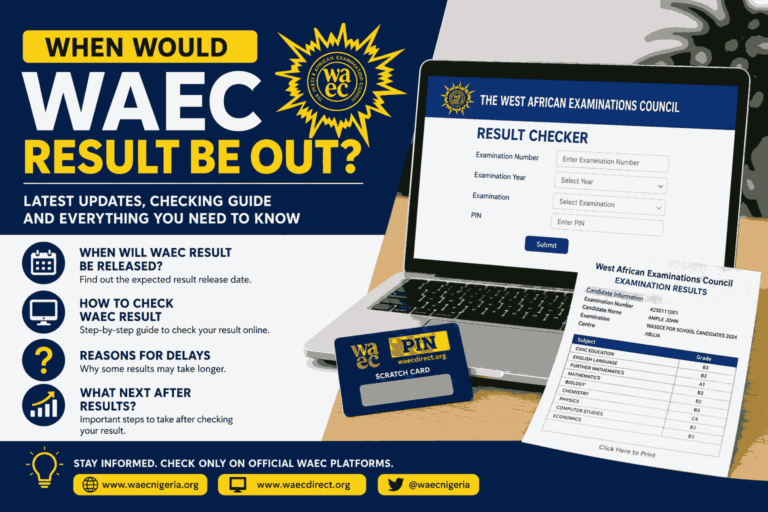
Step 1: Visit the Official WAEC Result Portal
Open your browser and visit:
This is the official website for checking WAEC results online.
Step 2: Enter Your Examination Number
Input your complete WAEC examination number carefully.
Example:
4250101001
Do not add spaces or symbols.
Step 3: Select Examination Year
Choose the year you wrote the examination from the dropdown menu.
Examples:
- 2024
- 2025
- 2026
Step 4: Select Examination Type
Choose the correct exam type.
Examples include:
- WAEC May/June
- WAEC GCE
- Private Candidate Examination
Selecting the wrong exam type can stop your result from displaying.
Step 5: Enter Scratch Card PIN
Type the:
- Result checker PIN
- Serial number
Exactly as shown on your scratch card or E-PIN.
Step 6: Click Submit
After entering all details correctly:
- Click “Submit”
- Wait a few seconds
Your WAEC result will appear on your phone screen.
How to Check WAEC Result Using SMS on Phone
Many students do not know that WAEC results can also be checked through SMS without internet access.
This method works on:
- MTN
- Airtel
- Glo
- 9mobile
SMS Format for WAEC Result Checking
Type:
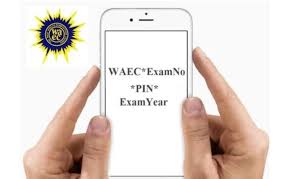
WAEC*ExamNo*PIN*ExamYear
Example:
WAEC*4250101001*123456789012*2026
Send it to:
32327
Important Things to Know About WAEC SMS Checking
Before using SMS to check your WAEC result using phone, note the following:
- You must have airtime on your SIM
- SMS charges apply
- The phone number must be active
- Network delays may occur sometimes
After sending the message, WAEC will reply with your result through SMS.
Benefits of Checking WAEC Result Using Phone
Checking WAEC result using phone comes with many advantages.
1. Fast and Convenient
You can access your result anywhere without visiting a café.
2. Saves Money
Using your phone reduces transportation and cyber café expenses.
3. Available 24/7
The WAEC portal works anytime as long as the server is active.
4. Easy Access
Even students in remote areas can check results using mobile phones.
Common Problems When Checking WAEC Result Using Phone
Many candidates experience errors while trying to check their WAEC results.
Below are common issues and how to solve them.
Invalid Scratch Card PIN Error
This happens when:
- Wrong PIN is entered
- PIN has already been used excessively
- Serial number is incorrect
Solution
- Re-enter the PIN carefully
- Check for typing mistakes
- Buy a new WAEC result checker PIN if needed
Result Not Available Error
Sometimes WAEC may still be uploading results.
Solution
- Wait for some hours
- Try again later
- Confirm that WAEC has officially released the results
Incorrect Examination Number
Entering the wrong exam number is a common mistake.
Solution
Cross-check your:
- Candidate number
- Center number
- Examination year
Network Problems
Poor internet connection can stop the portal from loading.
Solution
- Change network provider
- Use stronger internet connection
- Refresh the page
Website Server Busy
During result release periods, millions of students visit the WAEC portal simultaneously.
This can make the server slow.
Solution
- Check during midnight
- Retry later
- Refresh browser
How to Buy WAEC Result Checker PIN Using Phone
There are different ways to purchase WAEC checker PINs directly from your mobile phone.
1. Through Banks
Banks like:
- First Bank of Nigeria
- United Bank for Africa
- Guaranty Trust Bank
often sell WAEC result checker PINs.
You can purchase through:
- Mobile banking apps
- USSD banking
- Internet banking
2. Online Platforms
Some trusted websites sell WAEC checker PINs online.
Examples include:
Always buy from trusted platforms to avoid scams.
3. Cyber Cafés
Most cyber cafés across Nigeria sell WAEC checker cards.
How to Print WAEC Result After Checking on Phone
After successfully checking your result, you may want a printed copy.
Steps to Print WAEC Result
- Open the result page
- Click “Print”
- Save as PDF
- Send to nearby printing shop
You can also screenshot the result temporarily.
Can I Check WAEC Result Without Scratch Card?
No.
To check WAEC result using phone online, you need:
- WAEC result checker PIN
- Scratch card serial number
However, if your school already provided a checker PIN, you can use it.
How Many Times Can One WAEC PIN Be Used?
A WAEC result checker PIN has limited usage.
Most times:
- One PIN can check one result multiple times
- Excessive usage may lock the PIN
Always keep your PIN safe.
Can I Use Another Person’s Phone to Check My WAEC Result?
Yes.
WAEC result checking is not tied to a specific phone.
As long as you have:
- Exam number
- Examination year
- WAEC checker PIN
you can check your result from any smartphone.
Difference Between WAEC Result Checker and WAEC Certificate
Many students confuse WAEC result printout with WAEC certificate.
WAEC Result Printout
- Temporary online result
- Used for admissions
- Downloaded online
WAEC Certificate
- Official hardcopy issued by WAEC
- Collected from school
- Permanent document
How Long Does WAEC Result Stay Online?
WAEC results remain accessible online for years.
However, it is advisable to:
- Print your result early
- Save PDF copies
- Keep checker PIN secure
Can I Use Phone Browser Instead of Computer?
Yes.
Modern smartphones can access the WAEC portal easily.
Recommended browsers include:
- Google Chrome
- Mozilla Firefox
- Opera Mini
Tips for Successfully Checking WAEC Result Using Phone
To avoid frustration, follow these tips carefully.
Use Correct Details
Always double-check:
- Examination number
- PIN
- Serial number
- Examination year
Use Stable Internet
Avoid weak network connections.
Avoid Fake Websites
Only use official WAEC portals.
Official links include:
Save Your Result
After checking:
- Screenshot it
- Save PDF copy
- Print hardcopy
Why Students Prefer Checking WAEC Result Using Phone
Today, most students prefer smartphones because they are:
- Faster
- Easier
- More accessible
- Portable
Instead of waiting in long cyber café queues, candidates now check results instantly from home.
Security Tips While Checking WAEC Result Online
Cyber fraud has increased in recent years.
To stay safe:
- Do not share your checker PIN publicly
- Avoid suspicious websites
- Use trusted internet connections
- Never pay random social media vendors
Latest Updates About WAEC Result Checking
WAEC continues improving its digital services every year.
Recent improvements include:
- Faster result processing
- Better mobile compatibility
- Improved SMS services
- Enhanced security systems
Students are now able to check results more conveniently than before.
Conclusion
Knowing how to check WAEC result using phone is very important for every candidate in Nigeria and other West African countries. Whether you decide to use the WAEC online portal or SMS method, the process is now simple, fast, and convenient.
The most important things you need are:
- Correct examination number
- Examination year
- WAEC checker PIN
- Stable internet or airtime
Always use the official WAEC portal and avoid fake websites that may steal your information.
With the steps explained in this guide, you should now be able to check your WAEC result successfully using your mobile phone without stress.
Also Read: Is the 2026 WAEC Syllabus Out? Everything Students Need to Know
Frequently Asked Questions (FAQs)
1. Can I check WAEC result using phone without internet?
Yes. You can use the SMS method by sending your details to 32327.
2. How much is WAEC result checker PIN in Nigeria?
The price changes occasionally, but it usually costs between ₦1,500 and ₦3,500 depending on the vendor.
3. Why is my WAEC result showing outstanding?
This usually means WAEC is still processing some subjects or reviewing certain papers. You may need to check again later.












+ There are no comments
Add yours