






If you are asking how can I register for JAMB on my phone, you are not alone. Thousands of Nigerian candidates search this question every year, especially those who want to avoid stress, cybercafés, or misinformation. The good news is that you can start and complete major parts of JAMB registration using your phone, provided you follow the correct steps and understand what must still be done at an accredited centre.
This guide answers how can I register for JAMB on my phone in a clear, practical, and Nigerian-friendly way. It explains everything you need to know, including mistakes to avoid, phone requirements, SMS steps, profile creation, ePIN payment, CBT centre selection, and final submission.
Understanding JAMB Registration in Nigeria
Before going deeper into how can I register for JAMB on my phone, it is important to understand what JAMB registration truly involves.
The Joint Admissions and Matriculation Board (JAMB) is responsible for conducting the UTME and Direct Entry examinations in Nigeria. JAMB registration is not just form filling; it includes:
- Profile creation
- NIN verification
- ePIN purchase
- Biometric capture
- Subject and institution selection
Your phone can handle many of these steps, but biometric capture must be done at an accredited CBT centre.
Can I Truly Register for JAMB Using Only My Phone?
This is one of the most common questions related to how can I register for JAMB on my phone.
The honest answer:
You can start and manage most of the process on your phone, but final biometric registration must be completed at a JAMB-accredited CBT centre.
So when people ask how can I register for JAMB on my phone, what they really mean is:
- Can I create my JAMB profile on my phone? → Yes
- Can I get my JAMB profile code on my phone? → Yes
- Can I buy my JAMB ePIN on my phone? → Yes
- Can I choose institutions and subjects on my phone? → Yes (pre-registration)
- Can I do fingerprint capture on my phone? → No
Requirements Before You Register for JAMB on Your Phone
Before attempting how can I register for JAMB on my phone, ensure you have the following:
1. A Functional Smartphone
- Android or iPhone
- Stable browser (Chrome, Safari, or Firefox)
2. Active Phone Number
- Must be linked to your NIN
- Must remain active throughout admission
3. National Identification Number (NIN)
- JAMB registration cannot proceed without NIN
4. Internet Connection
- For portal access and ePIN purchase
5. Valid Email Address
- Personal email, not cybercafé email
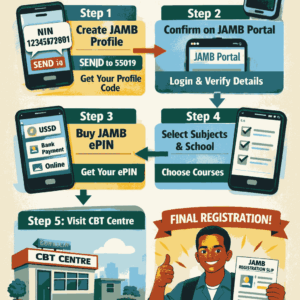
Step 1: Create Your JAMB Profile Using Your Phone
This is the first and most important step in learning how can I register for JAMB on my phone.
How to Create JAMB Profile via SMS
Using your phone, send an SMS in this exact format:
NIN Your11DigitNIN
Send it to 55019 or 66019
Example:
NIN 12345678901
What Happens Next
- You will receive a 10-digit JAMB Profile Code
- This code is very important
- Save it carefully
Without this profile code, you cannot register for JAMB, whether on phone or at CBT centre.
Step 2: Confirm Your Profile on the JAMB Portal (Using Your Phone)
Once you have your profile code, the next stage in how can I register for JAMB on my phone is portal confirmation.
Steps
- Open your phone browser
- Visit https://portal.jamb.gov.ng
- Click Create e-Facility Account
- Enter your profile code
- Set your password
- Verify email and phone number
This gives you full access to your JAMB dashboard using your phone.
Step 3: Buy JAMB ePIN Using Your Phone
Another major question tied to how can I register for JAMB on my phone is payment.
You can buy your JAMB ePIN directly on your phone using any of the following:
Available Payment Methods
- Bank USSD (e.g. *737#, *901#)
- ATM card (online)
- Mobile banking apps
- Approved online vendors
Important Notes
- The ePIN is linked to your profile code
- Cost usually includes:
- UTME form
- Reading text
- CBT service charge
After payment, the ePIN will be sent via SMS or email.
Step 4: Choose Institution and Subjects on Your Phone
Many candidates don’t know this part of how can I register for JAMB on my phone.
Using your phone:
- Log into your JAMB portal
- Preview:
- First choice institution
- Second choice institution
- UTME subjects
- O’Level details
This does not replace CBT centre registration, but it reduces errors later.
Step 5: Visit an Accredited CBT Centre (Final Step)
Even after doing everything above, you must still visit a CBT centre.
This is the final stage of how can I register for JAMB on my phone.
At the CBT centre:
- Your biometrics (fingerprint & passport) will be captured
- Your details will be confirmed
- Your registration slip will be printed
No CBT centre → No valid JAMB registration.
Common Mistakes to Avoid When Registering for JAMB on Your Phone
Many candidates fail despite knowing how can I register for JAMB on my phone. Avoid these errors:
- Using a phone number not linked to NIN
- Losing your profile code
- Paying through unverified agents
- Using wrong email address
- Registering subjects that don’t match course requirements
Advantages of Registering for JAMB Using Your Phone
Understanding how can I register for JAMB on my phone gives you these benefits:
- Saves time
- Reduces cybercafé stress
- Helps you monitor your details
- Prevents wrong information
- Gives you control over your registration
Also Read: HAS JAMB STARTED GIVING ADMISSION FOR 2026? EVERYTHING YOU MUST KNOW (2026 ADMISSIONS UPDATE)
Frequently Asked Questions (FAQs)
1. Can I complete JAMB registration without going to a CBT centre?
No. Even if you understand how can I register for JAMB on my phone, biometric capture must be done at a CBT centre.
2. Can I use someone else’s phone to register for JAMB?
Yes, but the phone number must belong to you and be linked to your NIN.
3. What happens if I lose my JAMB profile code?
You can retrieve it by resending your NIN SMS or logging into your JAMB portal.
Conclusion
If you have been asking how can I register for JAMB on my phone, the answer is now clear. Your phone can handle profile creation, payment, confirmation, and monitoring, but final biometric registration must be done at an accredited CBT centre.
By following the steps in this guide carefully, you avoid mistakes, save money, and protect your admission chances. With the right information, registering for JAMB on your phone becomes simple, safe, and stress-free.













+ There are no comments
Add yours